Health Records
📍 Find this in the app: Admin Panel → Stables → Boarded Horses → open a horse → Records (
/admin/stables/horses/:id/records) · Member Portal → Horse Records (/members/horse-records)
Keeping track of vaccinations, deworming, and farrier (hoof care) visits is crucial. The system handles these as special types of records.
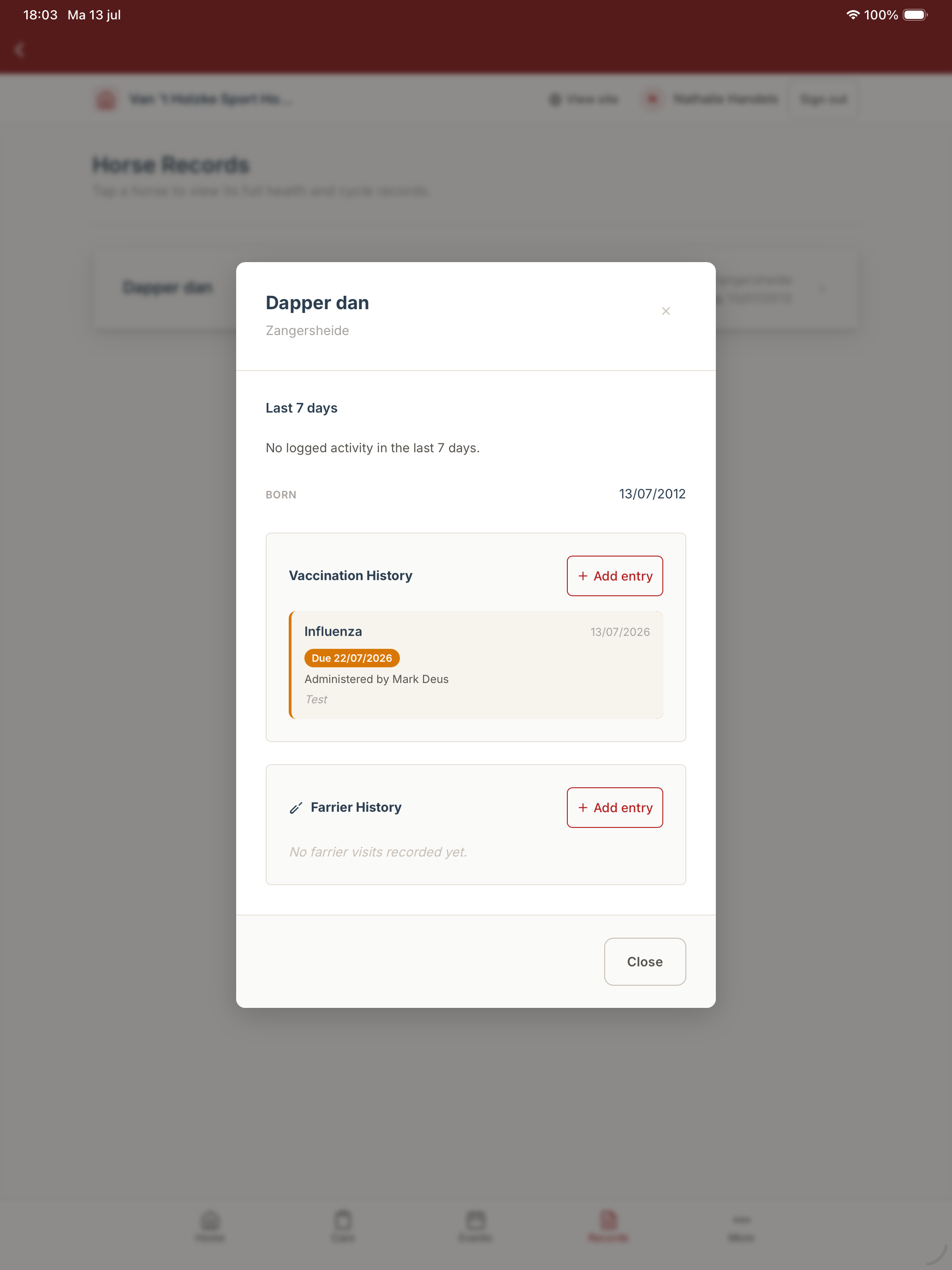
A horse's health records in the native mobile app, including the last-7-days activity summary, vaccination and farrier history:
For breeding mares, heat cycles, insemination dates, and pregnancy/due-date tracking live in a separate breeding log — see Mare Cycle & Pregnancy Tracking.
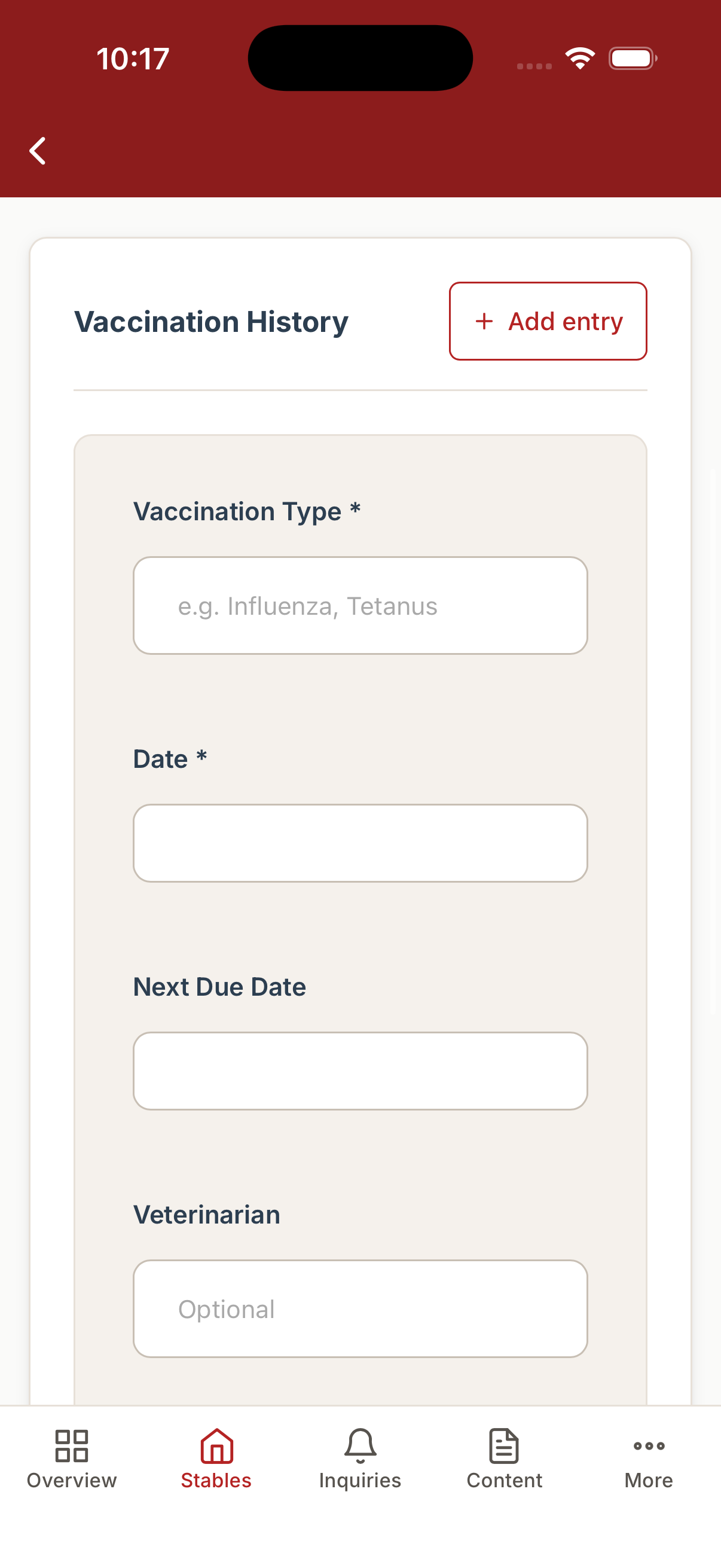
Adding a vaccination entry from mobile:
Who can see this, and who can manage it
This is the same screen everywhere it appears — an admin, and the horse's own owner in the Member Portal, see and manage the exact same vaccination, deworming, and farrier history, with the same Add/Renew/Edit/Delete options. There's no separate "admin version" and "member version" of a horse's health record; whatever an admin logs, the owner sees immediately, and vice versa.
Staff have a narrower view: from the touch-mode barn grid, staff can open a horse's 7-day activity timeline to check recent care, but the full vaccination/farrier history and its Add/Renew/Edit/Delete controls live on this Records page, which is an admin and member surface. However, staff can quickly log a deworming directly from their mobile kiosk (touch mode) on the barn floor. See Boarded Horses for more on what staff can do.
Smart Dashboard Alerts
The system automatically tracks upcoming and overdue deworming and vaccination dates. Admins are alerted in the "Today's Attention" widget on the Admin Dashboard, ensuring no horse falls behind on their schedule.
1. Adding a Record (Create)
To add a health record, open a horse's profile and navigate to the Health section.
Vaccinations
Fields you will fill out:
- Type: What the vaccination was for (e.g., Flu, Tetanus).
- Date: The exact day the shot was given.
- Next Due Date: When the horse needs to get this shot again. This helps you plan for the future.
- Veterinarian: The name of the doctor who gave the shot.
- Notes: Any reactions the horse had or specific brands of vaccine used.
Deworming
The Deworming module allows stables and owners to maintain accurate records of parasite control, schedule future treatments, and manage bulk administrations efficiently.
For Admins Adding a Single Record
- Navigate to Stables > Horses and click on the horse you want to manage.
- Go to the Records tab.
- Locate the Deworming section and click Add Deworming.
- Fill in the required details:
- Product / Brand Name: Free-text field for the specific dewormer used.
- Date: When it was administered.
- Next Due: Optional. If set, the system will alert you when this date approaches.
- Administered By & Notes: Optional context for your records.
- Click Apply.
Dashboard Alerts Overdue dewormings will automatically appear in your Admin Dashboard under the "Today's Attention" widget. Clicking the alert will take you directly to the relevant horse to renew their record.
For Staff (Mobile Kiosk) Staff can quickly log deworming administrations while on the go using the touch-friendly interface.
- Open the Staff Horses view on your mobile device or barn tablet.
- Tap on the relevant horse's name to open their activity timeline.
- Tap the Add Deworming button.
- Enter the product name and date.
- Tap Save. A success message will briefly appear to confirm the log. (Note: Staff logs are stored offline and will sync automatically when internet connectivity is restored.)
For Members / Owners Members can view and maintain their own horses' deworming histories.
- From your Member Dashboard, click on your horse.
- Navigate to the Deworming section to view past records.
- To add a new record (e.g., if you administered it yourself), click Add Deworming and fill out the details. Admins will immediately have access to these updated records.
Farrier Appointments
Fields you will fill out:
- Date: The day the farrier visited.
- Time: What time they arrived.
- Farrier Name: Who did the work.
- Notes: Specific details, like "Put pads on the front feet."
Bulk Adding Health Records
Just like chores, you can log health records for the entire barn at once. Bulk Deworming / Vaccination:
- Navigate to Stables > Horses.
- Use the checkboxes on the left to select multiple horses (or click "Select All").
- Click the Deworming (or Health) button in the bulk action bar at the bottom of the screen.
- Fill out the details (Product, Date, Next Due). These details will be applied to all selected horses simultaneously.
- Click Apply.
2. Viewing Records (Read)
Anyone looking at the horse's profile can open the Health section to see a complete timeline of every vaccination, deworming, and farrier visit the horse has ever had. This is incredibly useful for providing medical history to buyers or new vets.
Vaccinations and Dewormings are grouped by type or product, not shown as one long flat list. For vaccinations (e.g., Tetanus, West Nile Virus) and dewormings, each gets its own row that you can expand to see the full history. Each group's header shows a status badge when it needs attention:
- Overdue — the next-due date has already passed.
- Due soon — the next-due date is coming up.
No badge means that the record is currently up to date. Expanding a group shows the most recent entry first (with its date, next-due date, person who administered it, and notes), followed by every earlier entry for that same type, going back roughly 13 months.
Recent activity (last 7 days)
Alongside the health history, the horse's records also show a 7-day activity timeline — the day-to-day care the stable has logged (trained, lunged, turned out, fed, and so on), including who did it and any notes. Owners get the same view of their own horse that staff and admins see, so it's easy to check what your horse has been up to this week — and the timeline flags when its training load looks high, as a gentle guard against overtraining. See Task Management for how this history is built.
3. Changing a Record (Update)
There are two different ways to update a vaccination or deworming, and it's worth knowing which one to reach for:
Renew — the one-click way to record a repeat dose. Next to each vaccine type or dewormer is a Renew button. Click it and a form opens already filled in with that type, today's date, and a calculated next-due date — so confirming an overdue or upcoming dose is normally just "click Renew, click Save," nothing to retype. This always adds a brand-new entry to that history; it never overwrites the old one, so the full history stays intact and the "Overdue"/"Due soon" badge clears automatically once the new date is saved.
Edit — for fixing a mistake on an existing entry. If you made a typo on a specific entry (like entering the wrong date or misspelling a name), open that entry and click Update (the pencil icon) to correct it in place. Unlike Renew, Edit keeps the entry's original dates untouched unless you deliberately change them — it's for correcting what's already there, not for logging a new dose.
Farrier appointments work the same way as any other record: open the specific entry and edit the incorrect fields, then save.
4. Removing a Record (Delete)
If a record was entered on the wrong horse, you can delete it. Simply find the record in the timeline and click the "Delete" button. It will be permanently erased from that horse's medical history.